
If you recently switched to Hotmail account and unable to access Gmail emails in the same and at the same time wondering how to forward Gmail emails to Hotmail account with ease! Then, no worries at all as in the write-up we have offered multiple solutions will help you forwarding Gmail emails to Hotmail account.
Common Scenario
I moved to a new organization where Hotmail account is used for email management. However, in my previous company, I was using Gmail account for the same. Now, after moving to a new company where Hotmail is in use, I am facing issues while accessing the emails of my earlier email service in my new email platform. I am unable to find any suitable method to forward Gmail emails to Hotmail account directly. If anyone can suggest me any appropriate approach for it, I will really appreciate. Thanks!
How to Forward Gmail Emails to Hotmail Account?
There are two different ways to forward Gmail emails to Hotmail account –
- Manual Method
- Direct Solution
Method 1. Manually Forward Gmail Emails to Hotmail Account
Step 1. Open Gmail account.
Step 2. Go to the gear icon (Settings) displaying on the right screen of Gmail window and tap See All Settings.
Step 3. Tap Forwarding and POP/IMAP.
Step 4. Navigate to forwarding section and click Add a Forwarding Address.
Step 5. Add the address of a desired Hotmail account to forward Gmail emails.
Step 6. Tap Next, click Proceed, and press OK.
Step 7. A verification message will be sent to specified forwarding address.
Step 8. Open Hotmail account and click the verification link.
Step 9. Navigate back to the Settings page in Gmail.
Step 10. Refresh the browser.
Step 11. Go to Forwarding and POP/IMAP tab.
Step 12. From Forwarding section, choose Forward a copy of incoming mail to.
Step 13. Select Keep Gmail’s copy in the Inbox option.
Step 14. Press Save Changes.
By using the steps, one can forward Gmail emails to Hotmail account. But somehow it will be quite lengthy and technical for novice users. So, to overcome such challenges, it is advisable to forward emails from Google Mail to Hotmail account.
Method 2. Directly Forward Emails from Gmail to Hotmail Account
The direct method to forward Gmail emails to Hotmail account is MacMister Gmail Backup Tool Mac & Windows. The application allows users to establish connection with Gmail account and forward the entire inbox from the same into Hotmail with precise email content and attachments. The software has only three operational clicks and is designed with a GUI which is understandable by anyone effortlessly.
Moreover, the tool is programmed with wide ranging features which can be utilized to forward Gmail emails to Hotmail account according to the requirements. Its filter options will help users forwarding only the specific emails from Google Mail account into Hotmail account.
Follow the Step-by-Step Software Working to Forward Gmail Emails to Hotmail Account on macOS
Step 1. Download, launch, and run the application on Mac-based system.
Step 2. Add Gmail credentials i.e. email ID and app password in desired fields and click Login.
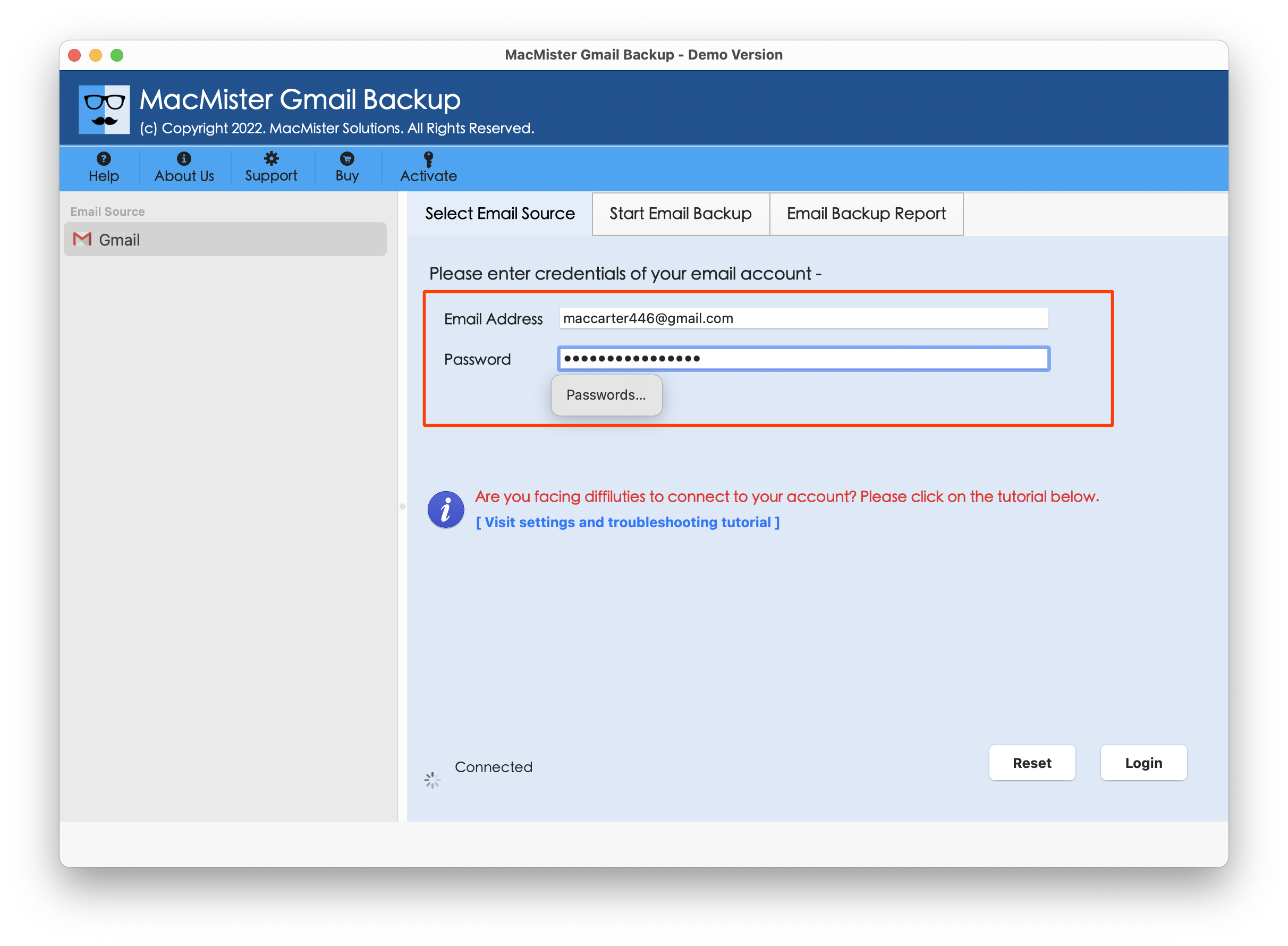
Step 3. After Gmail account is connected, the tool start showing Gmail folder items on the left side of the tool.
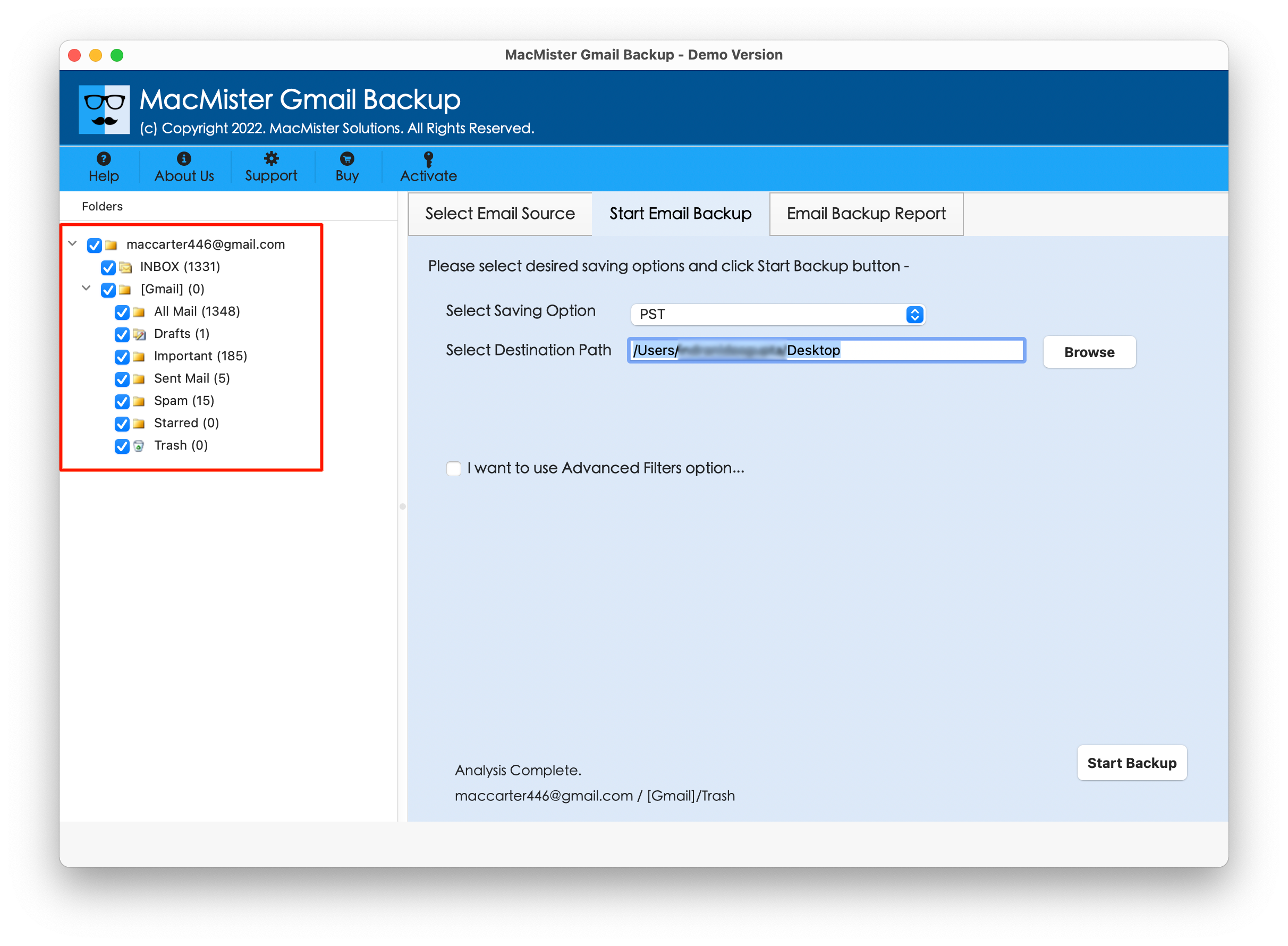
Step 4. Go to the right-side of the software, click Select Saving Options, and choose IMAP or Outlook.com saving type from the menu.

Step 5. Provide IMAP/Outlook.com credentials of Hotmail account with IMAP host and Port number. Also, use the desired filter type, if required. Then, click Start Backup button.
Step 6. The Email Backup Report screen will appear that deliver the live forwarding details of Gmail emails to users.

In fraction of seconds, the tool will finish the task and “Process Completed” notification will display on the screen. Click OK button and then login to specified Hotmail account to view resultant files. However, after going through the required forwarded email message, you will see that the app has successfully implemented the task. The Gmail emails will appear with precise text and formatting properties in Hotmail account.
Conclusion
The blog here mentioned a trouble-free solution to resolve how to forward Gmail emails to Hotmail account. MacMister Gmail Email Backup Software Mac & Windows safely forwarded Gmail email messages to Hotmail profile without data alteration. The solution is simple and highly secure. Anyone can operate the software without encountering any complexities and easily forward emails from Google Mail within seconds. Besides, its exceptional features will help users implementing the desired task according to the requirements. However, it has been introduced with a freeware version as well. Users can download it on any Mac OS and check the forwarding process in detail. It also allows forwarding first 25 Gmail emails free of cost.




